Your data. Your call.
Where your spots live in Hoch Maps, and how to keep them
Every hunter and angler has spots they don't share. In Hoch Maps, your pins (with their notes, photos and videos), tracks, journal, permission log, settings and the rest of your personal data live on your phone first. They work with no cell signal, and nothing leaves the phone unless you choose a place for it to go.
Pick where it syncs
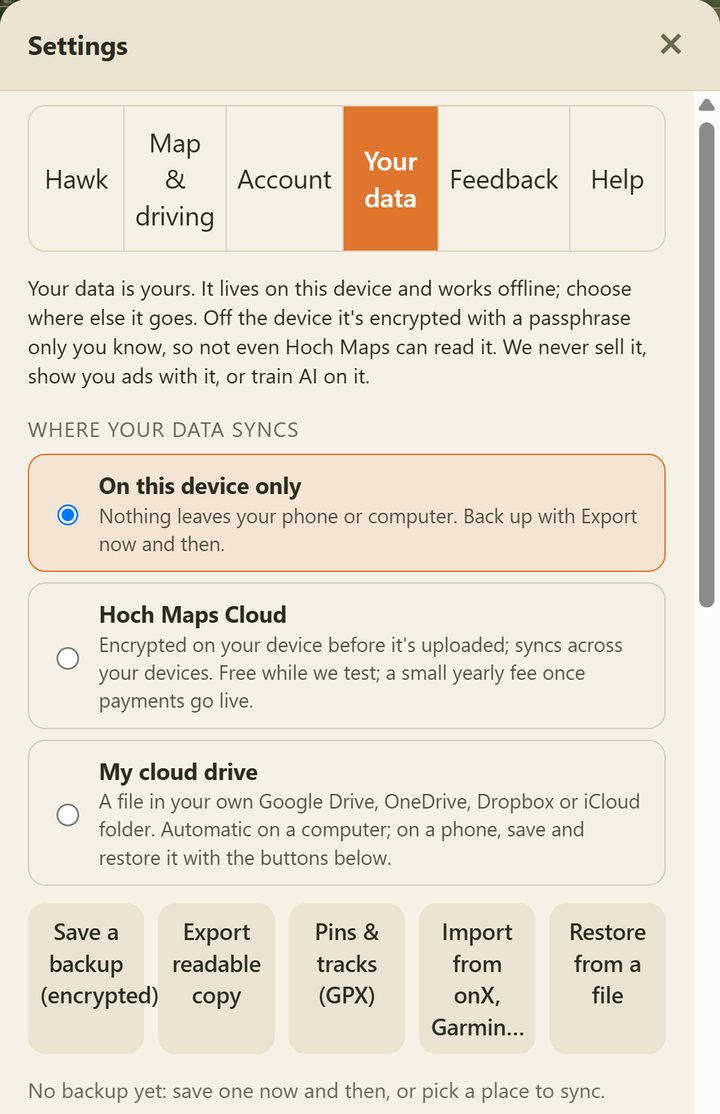
In the app, go to Settings › Your data and choose one:
Nothing leaves it. This is where everything starts. Save a backup now and then so a lost phone doesn't take your spots with it.
A file in your Google Drive, OneDrive, Dropbox or iCloud folder. It's your account and your file; we never see it.
Keeps your phone and computer in sync through our servers. Free while we test; a small yearly fee once payments go live.
The first time you save a pin or record a track, the app asks once where you'd like it kept. You can change it any time.
Locked with your passphrase
Whenever your data leaves your phone for any of those places, it's encrypted on the phone first (AES-256) with a passphrase only you know. We can't read it, and we can't reset a passphrase you forget, so write it down somewhere safe.
Take it with you
- Save a backup (encrypted): one file with everything, to keep wherever you like.
- Restore from a file: put it all on a new phone or computer.
- Export readable copy: everything in a plain file you can open and read.
- Pins & tracks (GPX): every pin and track in one GPX file that opens in onX, Garmin, Gaia GPS, Google Earth and most map apps.
- Import from onX, Garmin and others: bring your pins and tracks over from a GPX, KML or KMZ file (onX, Garmin Connect, Gaia GPS, Google Earth). Markers are matched where we can: a "Treestand" comes in as a tree stand.
- Delete: remove it all from your phone (and from Hoch Maps Cloud, if you used it) from the same screen.
If you keep everything on your phone only, the app reminds you about once a month to save a backup, but only after you have a handful of pins or tracks worth keeping, and never if something is already syncing on its own.
What goes through our servers
- Your account: your name, username, email and plan, so you can sign in.
- Things you choose to share: friends, crews, messages, shared pins and live location only work by passing through our servers, and only the people you pick can see them.
- Public posts you make: reports, lost & found and landowner listings, which are meant for others to see.
- Questions for Hawk: sent to the AI to get answered, not saved. We keep only a count of questions for your plan's limits.
The full details are in our privacy policy. Questions? Email tylan@hochhunt.com.